Many Australian businesses invest thousands into SEO and paid ads — but quietly lose rankings because of one overlooked problem: a slow website. In 2026, WordPress speed optimisation in Australia is no longer optional. It is one of the most critical factors shaping your search visibility, user experience, and bottom line.
Google’s ranking systems now heavily reward website performance. If your WordPress site is slow, you are not just frustrating visitors — you are actively handing rankings to competitors.
This guide explains why website loading speed matters, how Core Web Vitals affect your rankings, and exactly what you can do to fix it.
Why Website Speed Matters More Than Ever in 2026
Google’s March 2026 core update significantly increased the ranking weight of page experience signals. According to industry tracking data, over 55% of tracked domains shifted more than five positions during the rollout — directly linked to how well their sites performed on Core Web Vitals benchmarks.
This is not a future concern. It is happening right now.
Websites that load quickly signal to Google that they offer a quality user experience. Those that do not are being pushed down the results page — even when their content is strong. For Australian businesses competing in crowded local markets, this makes website performance optimisation a ranking factor you simply cannot ignore.
The 2026 update also gave significantly more weight to Interaction to Next Paint (INP), which measures how responsive your website feels to real user interactions. Many WordPress sites that previously scored adequately are now falling behind because of poor interactivity performance.
Expert Insight: Most Australian WordPress websites fail Core Web Vitals not because of poor content, but because of oversized hero images, unoptimised hosting environments, and plugin bloat that quietly accumulates over time.
Does Page Speed Affect SEO in Australia?
Quick Answer: Yes. Page speed directly affects SEO in Australia. Google evaluates user experience using Core Web Vitals and mobile-first indexing, and websites that load faster often earn higher rankings, reduced bounce rates, and improved user engagement.
The connection between website speed and Google rankings in Australia is well-established and supported by Google’s own documentation on page experience signals.
Here is why it matters across the board:
- Rankings: Slow sites signal poor user experience. Google’s systems favour faster competitors — even when your content is stronger.
- Mobile experience: According to Think with Google, over 60% of searches in markets like Australia now occur on mobile devices. Google uses mobile-first indexing, meaning your mobile performance determines your ranking — not your desktop experience.
- User behaviour: Visitors who leave immediately send negative engagement signals to Google that your page failed to meet search intent.
- Crawl efficiency: Googlebot operates on a limited crawl budget. A slow server response time means the bot crawls fewer pages per visit, leaving important content unindexed.
Website speed and Google rankings in Australia are more tightly connected in 2026 than at any previous point in Google’s history.
Understanding Core Web Vitals Australia
Quick Answer: Core Web Vitals are Google’s three primary performance metrics — LCP, INP, and CLS. They assess a website’s loading performance, responsiveness, and visual stability. All three are direct ranking signals.
Core Web Vitals are Google’s official set of performance metrics that measure real-world user experience. They are a direct ranking signal and one of the most important technical SEO considerations for Australian businesses in 2026.
Largest Contentful Paint (LCP)
Largest Contentful Paint (LCP) measures how long it takes for the main content of your page — usually a hero image, headline, or featured block — to fully load on screen.
- Good score: Under 2.5 seconds
- Why it matters: LCP is the user’s first real impression of your site. If it takes more than 2.5 seconds to render, Google considers this a poor experience and your rankings reflect it.
- Common culprit: Oversized images, unoptimised hero sections, and slow hosting are the primary drivers of poor LCP scores on WordPress websites.
Real-World Example: In a recent WordPress speed audit of an Australian professional services website, oversized hero images alone contributed 2.3 seconds to the LCP score — pushing the site well into the “needs improvement” range and suppressing rankings for competitive local keywords.
Interaction to Next Paint (INP)
Interaction to Next Paint (INP) replaced First Input Delay (FID) and is now one of the most heavily weighted Core Web Vitals signals following Google’s March 2026 update.
- Good score: Under 200 milliseconds
- Why it matters: INP measures how quickly your website responds when a user clicks a button, taps a link, or interacts with any element. A sluggish response frustrates users and signals poor quality to Google.
- Common culprit: Too many plugins, heavy JavaScript, and third-party scripts like live chat widgets and tracking pixels.
Cumulative Layout Shift (CLS)
Cumulative Layout Shift (CLS) measures visual stability — how much the page content shifts or jumps while loading.
- Good score: Under 0.1
- Why it matters: If elements move while a user is reading or about to click, it creates a frustrating and untrustworthy experience. Google measures this and uses it as a quality signal.
- Common culprit: Images without defined dimensions, dynamically injected content, and web fonts that load late and cause text to reflow.
The Hidden SEO Cost of a Slow WordPress Website
Slow website loading speed does not just affect your rankings directly. It triggers a chain of negative user behaviour signals that compound over time and are increasingly difficult to reverse.
High Bounce Rate
According to Think with Google research, 53% of mobile users abandon a page if it takes longer than three seconds to load. In Google’s eyes, a user who immediately returns to the search results — a behaviour known as “pogo-sticking” — signals that your page failed to deliver what they were looking for.
Over time, consistent pogo-sticking suppresses your organic rankings, even on pages with strong content.
Real-World Scenario: Imagine a Sydney accounting firm whose homepage takes five seconds to load. A potential client finds the firm on Google, clicks through, waits, becomes frustrated, and hits the back button. That lead is now viewing a competitor’s website instead — and Google has recorded the signal.
Pogo-Sticking
Pogo-sticking occurs when a user clicks your result, quickly leaves, and engages with a competitor’s result instead. This communicates to Google that your page does not satisfy search intent — regardless of how strong your content actually is. It is one of the most damaging indirect SEO signals a slow website generates.
Crawl Budget Waste
Googlebot has a limited crawl budget for each website. On slow websites, the bot spends more time waiting for pages to respond, meaning fewer pages get crawled and indexed per visit. For larger WordPress sites with hundreds of service pages, blog posts, or WooCommerce product listings, this can leave significant content completely invisible in search results.
Lost Conversions and Revenue
Speed problems are not just an SEO concern — they are a direct business issue.
- According to research cited by Google, a 100ms delay in page load time can result in a 1% drop in revenue. Amazon’s own internal studies observed this pattern at scale.
- A one-second delay in page response is linked to a 7% reduction in conversions (Akamai / Google research).
Slow landing pages hurt Google Ads performance too. Core Web Vitals feed directly into your landing page experience score, which influences Quality Score and ultimately your cost-per-click (CPC). A slow-loading page can increase advertising costs for the same ad placement.
What Makes a WordPress Website Load Slowly?
Quick Answer: The most common causes are oversized images, too many plugins, poor hosting infrastructure, un-optimised code, and a lack of caching. Most slow WordPress sites are suffering from several of these issues at once.
Unoptimised Images
Unoptimised images are the single most common cause of poor Largest Contentful Paint (LCP) scores on Australian WordPress websites. Large JPEG or PNG files can easily add two to four seconds to your page load time.
The fix involves converting images to modern formats like WebP or AVIF, which deliver the same visual quality at a fraction of the file size. Combined with image compression before upload and proper lazy loading for images below the fold, this single change can dramatically improve Core Web Vitals scores.
Common Issues We See in Speed Audits:
- 4MB+ homepage hero images uploaded directly from camera or stock photo sites
- PNG screenshots used as content images instead of compressed WebP files
- No lazy loading enabled, causing all images to load simultaneously on page arrival
Plugin Bloat
WordPress makes it easy to install plugins — which is both its greatest strength and a common performance trap. Every plugin adds code the browser must process. Too many plugins, or poorly coded ones, compete for the browser’s resources and slow down INP and overall website loading speed.
A lean, well-audited plugin setup is consistently faster than a site running thirty partially-used tools.
Heavy Page Builders
Is Elementor Bad for Page Speed?
Elementor is not inherently bad for page speed. It is one of the most widely used WordPress page builders in Australia for good reason. However, poor configuration causes significant website performance problems.
The common issues are:
- Too many widgets loading JavaScript and CSS on every page regardless of use
- Excessive animations and parallax effects that add render-blocking scripts
- Third-party Elementor add-on plugins stacking unnecessary code
- Elementor’s default CSS loading on pages that do not use it
A well-configured Elementor site with lean widgets, conditional asset loading, and proper caching can perform very well. A poorly configured one will fail Core Web Vitals consistently.
Cheap Shared Hosting
Shared hosting places your website on a server alongside hundreds — sometimes thousands — of other websites. When neighbouring sites experience traffic spikes, your site slows down too.
Cheap shared hosting creates a permanent server response time ceiling that no amount of caching or image optimisation can fully overcome. Server response time (measured as Time to First Byte or TTFB) directly impacts your LCP score — because the browser cannot begin loading content until the server responds.
Expert Insight: A poorly performing server environment is the single hardest speed problem to solve with plugins alone. Hosting infrastructure is a foundational decision, and the wrong choice creates a ceiling that all other optimisations bump up against.
Lack of Caching
Without caching, your server rebuilds every page from scratch each time a visitor arrives. Browser caching on WordPress — combined with page caching and object caching — allows pages to be stored and served near-instantly, dramatically reducing server load and website loading speed issues caused by database-heavy WordPress environments.
How to Improve WordPress Page Speed in Australia
Quick Answer: Improve your hosting infrastructure, compress and convert images to WebP, enable page and browser caching, use an Australian CDN, remove unnecessary plugins, and address Core Web Vitals issues directly.
Not sure what is slowing your website down? A professional WordPress speed audit can identify the exact bottlenecks affecting your rankings, Core Web Vitals scores, and conversions — before another Google update costs you further visibility.
Run a Website Speed Test First
Before making changes, benchmark your current performance using reliable website performance monitoring tools:
- Google PageSpeed Insights — The most direct tool for understanding how Google evaluates your site. It provides both field data (real user measurements from Chrome) and lab data, alongside actionable improvement recommendations for LCP, INP, and CLS.
- GTmetrix (Australia) — Set the test server location to Sydney for accurate, Australia-specific performance data. GTmetrix provides a detailed waterfall chart showing exactly which elements are slowing your site down and by how much.
Start with data. Attempting to fix website loading speed problems without a baseline is guesswork.
Optimise Images
Image optimisation is the fastest and highest-impact improvement for LCP on most Australian WordPress websites.
Steps to take:
- Convert images to WebP format (supported by all modern browsers and served natively in WordPress 6+)
- Consider AVIF for even greater compression on fully supporting browsers
- Apply image compression to reduce file sizes before uploading
- Enable lazy loading for images so below-the-fold assets only load when needed
- Set explicit width and height attributes on all images to prevent CLS (layout shift during load)
Most quality image optimisation plugins handle format conversion and compression automatically once configured.
Enable Caching
Caching is one of the most impactful website performance optimisation improvements available to any WordPress site.
There are three essential types:
- Page caching — Stores a static HTML version of each page so the server does not rebuild it dynamically for every visitor.
- Object caching — Stores database query results in memory (Redis or Memcached), reducing database load on dynamic and WooCommerce-heavy pages.
- Browser caching on WordPress — Instructs visitors’ browsers to store static assets locally so repeat visits load significantly faster.
Use a Content Delivery Network (CDN)
Why a CDN Australia Matters
A CDN (Content Delivery Network) stores copies of your website’s static files — images, CSS, JavaScript — on servers distributed globally, including within Australia.
When an Australian visitor arrives on your site, the CDN serves those files from the nearest server location (for example, Sydney) rather than a data centre located overseas. This reduces latency by hundreds of milliseconds and dramatically improves delivery speed for local users.
For any Australian business serving local traffic, a CDN Australia solution is not an optional extra — it is a foundational requirement for competitive Core Web Vitals performance.
Upgrade Your Hosting Infrastructure
If your site sits on cheap shared hosting, infrastructure upgrades will produce the most immediate and significant performance gains — gains that no plugin combination can replicate.
Look for hosting that offers:
- Sydney or Melbourne data centres to minimise server response time for Australian users
- NVMe SSD storage for significantly faster data read/write operations
- Server-side caching (LiteSpeed or Nginx FastCGI) built at the server level
- CDN integration included or easy to add
- Dedicated or cloud-isolated resources not shared with thousands of other sites
- PHP 8.2+ support and up-to-date server software
Managed WordPress hosting built on modern cloud infrastructure with local Australian points of presence consistently outperforms generic shared hosting for Core Web Vitals benchmarks.
Remove Technical Debt
Over time, WordPress sites accumulate unused code — CSS from deactivated plugins, JavaScript files that no longer serve a purpose, and bloated theme assets that load regardless of the page being viewed.
Key technical SEO audit clean-up tasks include:
- Removing or conditionally loading unused CSS and JavaScript
- Minifying remaining CSS and JavaScript files
- Deferring or asynchronously loading non-critical scripts
- Auditing and removing plugins that duplicate functionality or load scripts site-wide
- Cleaning up the WordPress database — post revisions, transients, and orphaned data
Removing technical debt reduces the amount of work the browser must complete before your page becomes interactive, directly improving INP scores and overall website performance.
The Vertical Infotech 5-Step WordPress Speed Optimisation Framework
When we approach a WordPress speed audit for Australian clients, we follow a structured process to identify and resolve performance issues systematically rather than reactively.
Step 1 — Audit Benchmark current performance using Google PageSpeed Insights, GTmetrix (Sydney server), and Chrome UX Report (CrUX) field data. Identify the top three Core Web Vitals issues by impact.
Step 2 — Optimise Images Audit all images for file size, format, and loading behaviour. Convert to WebP or AVIF, apply compression, implement lazy loading, and add explicit dimensions.
Step 3 — Improve Hosting and Delivery Evaluate server response time (TTFB), hosting tier, and CDN configuration. Recommend or implement infrastructure upgrades where the server is creating a performance ceiling.
Step 4 — Remove Technical Debt Audit plugins, scripts, and CSS for bloat. Remove, consolidate, or defer non-critical assets. Implement page, object, and browser caching.
Step 5 — Monitor Core Web Vitals Set up ongoing website performance monitoring using Google Search Console’s Core Web Vitals report and CrUX data. Schedule quarterly audits to catch regressions before they affect rankings.
This framework ensures speed improvements are sustainable — not just a one-time lift that degrades within three months.
WordPress vs Wix vs Squarespace: Speed Performance in Australia
If you are evaluating platforms or advising a client on a rebuild, understanding how the major platforms compare for website loading speed in Australia is important.
| Platform | Speed Potential | Control | Australian CDN | Core Web Vitals |
| WordPress (optimised) | Excellent | Full | Yes (with configuration) | Achievable 90+ |
| WordPress (default) | Poor–Moderate | Full | Requires setup | Often fails without optimisation |
| Wix | Moderate | Limited | Partial (built-in) | Inconsistent |
| Squarespace | Moderate | Limited | Partial (built-in) | Moderate |
What this means for Australian businesses:
WordPress has the highest speed ceiling of any major CMS — but it also has the highest floor for things to go wrong without proper configuration. A well-optimised WordPress site built by a professional team will consistently outperform Wix or Squarespace for Core Web Vitals, especially for complex sites with many pages.
Wix and Squarespace offer some built-in performance management, but you have limited ability to control server-side configuration, CDN settings, or technical debt. You are dependent on the platform improving — which it does on its own timeline.
For Australian SMEs serious about long-term SEO and website performance, WordPress — properly developed and maintained — remains the strongest platform choice.
What Is a Good PageSpeed Score for Australian Websites?
Quick Answer: A mobile PageSpeed score above 90 is considered strong. However, real-world Core Web Vital metrics — LCP, INP, and CLS — are more important than the score number alone for ranking purposes.
| Metric | Good Score | Needs Improvement | Poor |
| Mobile Performance (PageSpeed) | 90–100 | 50–89 | Under 50 |
| Largest Contentful Paint (LCP) | Under 2.5s | 2.5s–4s | Over 4s |
| Interaction to Next Paint (INP) | Under 200ms | 200ms–500ms | Over 500ms |
| Cumulative Layout Shift (CLS) | Under 0.1 | 0.1–0.25 | Over 0.25 |
A PageSpeed score of 90+ is a solid target, but do not fixate on the number. According to Google Search Central documentation, the ranking systems use field data — real user measurements collected from Chrome browsers — rather than lab scores from PageSpeed Insights alone. A site with a 94 lab score but poor field data will still underperform a site with genuine real-world speed.
Focus on the Core Web Vitals metrics in your Google Search Console field data report. The score will follow.
What Is the Best High-Speed WordPress Hosting in Australia?
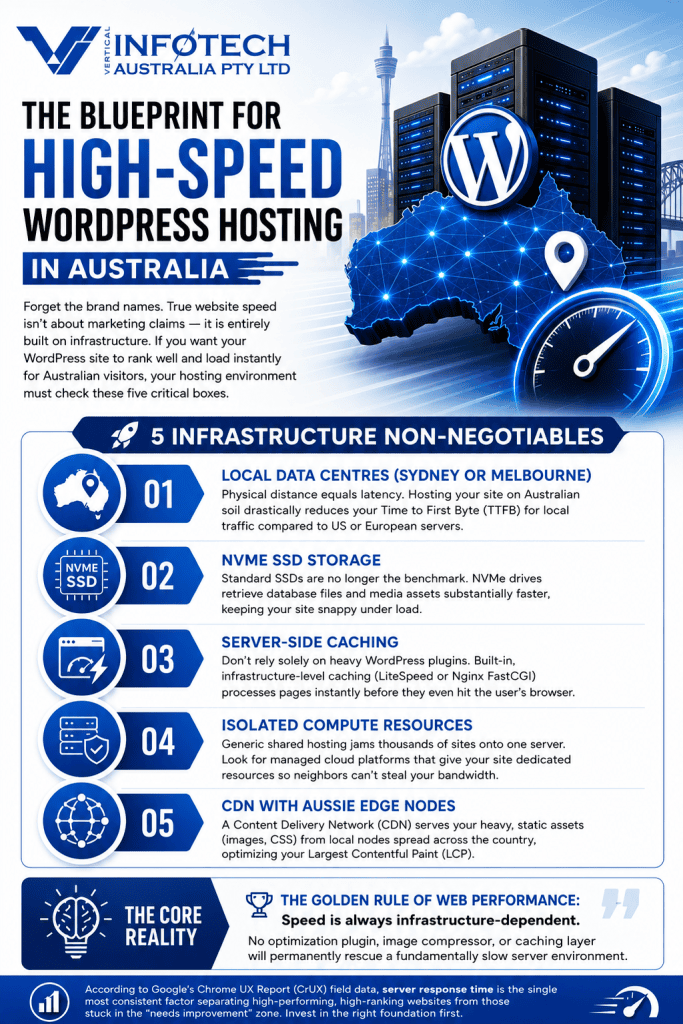
Quick Answer: The fastest WordPress hosting in Australia is not a single brand — it is a set of infrastructure features. Look for Australian-based servers, NVMe storage, server-side caching, CDN integration, and dedicated resources.
Rather than recommending a single provider, what matters is the underlying infrastructure. Fast WordPress hosting for Australian businesses should consistently offer:
- Sydney or Melbourne data centres to minimise server response time for local visitors
- NVMe SSD storage for substantially faster data retrieval compared to standard SSDs
- Server-side caching (LiteSpeed or Nginx FastCGI) operating at the infrastructure level — not just a plugin
- CDN integration for static asset delivery from local Australian edge nodes
- Dedicated or isolated compute resources not shared with thousands of other websites
- PHP 8.2+ support and current server software for WordPress compatibility and performance
- An Australian-based server will always beat an equivalent overseas server – Server location is the foundation the rest of the checklist sits on. on response time for local visitors, simply due to distance. VentraIP is one example of a provider hosting entirely on Australian infrastructure.
Managed WordPress hosting platforms built on cloud infrastructure with Australian points of presence consistently outperform generic shared hosting for LCP and TTFB benchmarks. According to the Chrome UX Report (CrUX), which Google uses for field data collection, server response time is one of the most consistent factors separating high-performing sites from those in the “needs improvement” range.
Speed is always infrastructure-dependent. No plugin, caching layer, or image optimisation will permanently overcome a fundamentally slow server environment.
Does Hosting Affect SEO?
Quick Answer: Yes. Your hosting infrastructure directly affects server response time (TTFB), which is one of the first factors Google measures. Slow hosting creates a performance ceiling that no amount of plugin optimisation can overcome.
Hosting affects SEO in three specific ways:
- Server response time (TTFB) — Slower servers mean slower page loads, directly harming LCP scores and triggering bounce behaviour.
- Uptime and availability — Frequent downtime means Googlebot cannot reliably crawl your site, leading to indexation gaps.
- Geographic proximity — Hosting on servers located overseas adds latency for Australian users. An Australian-based server or CDN Australia presence significantly reduces this.
For Australian businesses focused on local search performance, hosting your website on servers located in Australian data centres is more than a speed advantage — it is a critical competitive requirement.
How Fast Should a Business Website Load?
Quick Answer: According to Google’s Core Web Vitals standards, pages should reach Largest Contentful Paint (LCP) in under 2.5 seconds. For overall user experience, most pages should be fully interactive within three seconds on mobile connections.
Three seconds is the commonly cited threshold — and it is backed by user behaviour data. According to Think with Google research, 53% of mobile users abandon a page that takes longer than three seconds to load. For Australian businesses on competitive mobile search terms, every half-second improvement translates directly into visitor retention and conversion rate improvement.
On mobile networks (4G/5G), pages should ideally:
- Display main content (LCP) in under 2.5 seconds
- Become interactive (INP) within 200ms of user input
- Avoid visual shifts (CLS) of more than 0.1 during load
Can Slow Websites Hurt Google Ads Performance?
Quick Answer: Yes. Core Web Vitals feed into Google’s landing page experience score, which is a component of Quality Score. A poor Quality Score increases your cost-per-click and reduces ad visibility — meaning a slow website costs you more in paid search.
This is one of the most overlooked commercial impacts of poor website performance. When your WordPress landing page loads slowly:
- Google assigns a low landing page experience score as part of your Quality Score calculation
- A lower Quality Score means you must bid higher to maintain the same ad position
- Competitors with faster pages achieve the same visibility for less spend
- Your effective cost-per-acquisition increases across all paid campaigns
Businesses running Google Ads in competitive Australian markets — legal services, finance, real estate, healthcare, trades — often find that WordPress speed optimisation delivers a measurable reduction in CPC within weeks of implementation.
Why WordPress Speed Optimisation Is an Ongoing Process
Getting a strong PageSpeed score today does not guarantee your site stays fast tomorrow.
WordPress sites change constantly:
- Plugins update — sometimes introducing new scripts or dependencies that affect performance
- Themes evolve — new features often add code overhead to existing pages
- Content grows — more images, more pages, and larger database entries accumulate over time
- Google’s requirements shift — the benchmarks for Core Web Vitals are periodically reviewed and tightened
WordPress speed optimisation in Australia is not a one-time task. It is a continuous process that belongs inside your regular website maintenance strategy.
Without ongoing website performance monitoring and maintenance, a well-optimised site can regress to poor Core Web Vitals performance within three to six months. Scheduled technical SEO audits, proactive plugin management, and performance monitoring are what separate sites that sustain rankings from those that gradually slip after each Google update.
How Vertical Infotech Helps Australian Businesses Improve Website Performance
At Vertical Infotech, we help Australian businesses address the full spectrum of WordPress performance challenges — from initial WordPress speed audits to ongoing technical management.
Our Sydney-based team provides:
- WordPress speed audits — Comprehensive performance reviews using Google PageSpeed Insights, GTmetrix, and Chrome UX Report field data, delivered with a clear prioritised action list.
- Core Web Vitals improvements — Targeted fixes for LCP, INP, and CLS issues specific to your site’s architecture and content.
- Custom WordPress development — Performance-first builds that avoid the technical debt accumulation common in template-based sites. Explore our WordPress Development Services.
- WooCommerce optimisation — Speed improvements for product pages, checkout flows, and database-intensive store environments. Explore our [WooCommerce Development Services].
- Technical SEO services — Addressing crawl issues, indexation problems, and page experience signals as part of a broader search strategy. See our [Technical SEO Services].
- Website maintenance services — Ongoing management to keep your site fast, secure, and up to date as Google’s requirements evolve. Find out more about our [Website Maintenance Services].
We serve businesses across Sydney, Melbourne, Brisbane, Adelaide, and Perth — providing Australia-wide coverage with the technical depth of a specialist agency.
Free Website Speed Audit Not sure why your WordPress site is underperforming in Google? Our team can review your Core Web Vitals, hosting environment, plugin configuration, and technical SEO signals — and deliver a clear, prioritised action plan. Discover: Core Web Vitals issues · Hosting bottlenecks · Plugin bloat · Technical SEO risks [Request a Website Speed Audit →]
Conclusion
In 2026, WordPress speed optimisation in Australia is a critical factor in your search visibility, user experience, and revenue performance. A slow website costs you in multiple, compounding ways — lost organic rankings, missed conversions, frustrated visitors, and inflated advertising costs.
Core Web Vitals — LCP, INP, and CLS — are no longer background technical metrics. They are direct ranking signals with measurable commercial consequences. Google’s March 2026 update made that clearer than at any previous point.
Speed affects your rankings. Speed affects your conversions. Speed affects how much you pay per click in Google Ads. Every slow-loading page is leaving money on the table — and in competitive Australian markets, your competitors are already working to claim it.
If your WordPress website is not performing at its best, start with a speed test. Identify what is slowing it down. And if the issues run deeper than surface-level fixes, working with an expert team like Vertical Infotech can help you recover lost ground and protect your rankings before the next algorithm update lands.
Audit your website speed today — before your competitors do.
Frequently Asked Questions
Yes. According to Google’s documentation on page experience signals, page speed and Core Web Vitals are direct ranking factors. Faster websites provide better user experiences, producing improved rankings, stronger engagement signals, and higher conversion rates. With over 60% of Australian searches now occurring on mobile devices, mobile website loading speed is particularly critical for local search visibility.
Improve your hosting infrastructure, compress images and convert them to WebP, enable page and browser caching, use a CDN with Australian server locations, remove unnecessary plugins, and directly address Core Web Vitals metrics (LCP, INP, CLS). Begin with a benchmark test in Google PageSpeed Insights or GTmetrix using a Sydney test server — data-first is always faster than guesswork.
Common causes include oversized unoptimised images, excessive or poorly coded plugins, cheap shared hosting with slow server response time, heavy page builder configurations, and a lack of caching. According to field data from the Chrome UX Report, server response time and image loading are the two most consistent contributors to poor LCP scores on Australian WordPress websites.
Elementor itself is not bad for page speed. However, excessive widgets, animations, third-party add-on plugins, and poor configuration can significantly harm performance. A well-configured Elementor build — with conditional script loading, only necessary widgets, and proper caching — can achieve very strong Core Web Vitals scores. The problem is almost always configuration, not the platform itself.
The fastest hosting solutions for Australian businesses typically offer Sydney or Melbourne-based servers, NVMe storage, server-side caching, CDN integration, and dedicated resources not shared with thousands of other websites. Managed WordPress hosting on modern cloud infrastructure with local Australian data centre presence consistently outperforms generic shared hosting for Core Web Vitals benchmarks.
Largest Contentful Paint (LCP) measures how quickly the main visible content of a page — usually a hero image or primary headline — renders on screen. According to Google Search Central, LCP is a Core Web Vital and a direct ranking factor. A good LCP score is under 2.5 seconds. Poor LCP scores are strongly correlated with higher bounce rates, lower dwell time, and suppressed organic rankings.
A mobile PageSpeed score above 90 is considered strong. However, according to Google Search Central documentation, the ranking systems use real-world field data from Chrome users rather than lab scores alone. Core Web Vitals targets — LCP under 2.5 seconds, INP under 200ms, CLS under 0.1 — are more important than the score number for ranking purposes.
According to Think with Google research, 53% of mobile users abandon pages that take longer than three seconds to load. Google’s Core Web Vitals standards set LCP at under 2.5 seconds as the target for main content loading. For Australian businesses on competitive search terms, meeting or exceeding these benchmarks is essential for both rankings and conversion performance.
Yes. Your hosting environment determines server response time (TTFB), which directly impacts LCP — one of Google’s three Core Web Vitals. Slow hosting creates a performance ceiling that plugin-level optimisation cannot fully overcome. Hosting on Australian-based servers also reduces latency for local users, improving real-world performance metrics in the Chrome UX Report field data Google uses for ranking evaluation.
Yes. Core Web Vitals feed into Google’s landing page experience score, which is a component of Quality Score in Google Ads. A low Quality Score forces higher cost-per-click (CPC) bids to maintain the same ad positions. WordPress speed optimisation can directly reduce advertising costs by improving landing page experience scores across your paid campaigns.

Australian web design and SEO agency. Since 2015, we’ve built and optimised hundreds of websites for local tradies, ecommerce brands, and professional services businesses across NSW and VIC.